Finger Gesture Launcher
Publisher Description
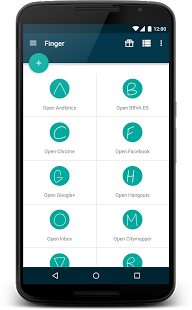
Finger Gesture Launcher is a very useful app if you usually use several applications at once, such as chatting with someone while surfing the internet or having a conversation on Facebook while writing with someone else on Whatsapp.
Forget access the app drawer to navigate between your applications. Accelerate and streamline the use of your Smartphone, while still interacting with the rest of your applications. Finger brings shortcuts that allow jumping from one app to another by simply tracing a gesture with a finger on the screen.
Features:
• Launch apps
• Launch shortcuts
• Launch Whatsapp conversations
• Make calls
• Open websites in your browser
• Change system settings
• Simulate home, back and menu buttons
• Lock screen
• Root options
All this by simply drawing a gesture on the screen with your finger.
★ Try Finger Gesture Launcher today ★
Follow us on Facebook and get discounts and free promo codes!
https://www.facebook.com/FingerApp
Support forum:
http://www.cockie.de/forum/viewforum.php?f=74
About Finger Gesture Launcher
The company that develops Finger Gesture Launcher is Carlos Morera de la Chica. The latest version released by its developer is 1.0 . This app was rated by 3 users of our site and has an average rating of 3.3.
To install Finger Gesture Launcher on your Android device, just click the green Continue To App button above to start the installation process. The app is listed on our website since 2015-12-22 and was downloaded 155 times. We have already checked if the download link is safe, however for your own protection we recommend that you scan the downloaded app with your antivirus. Your antivirus may detect the Finger Gesture Launcher as malware as malware if the download link to com.carlosdelachica.finger is broken.
How to install Finger Gesture Launcher on your Android device:
- Click on the Continue To App button on our website. This will redirect you to Google Play.
- Once the Finger Gesture Launcher is shown in the Google Play listing of your Android device, you can start its download and installation. Tap on the Install button located below the search bar and to the right of the app icon.
- A pop-up window with the permissions required by Finger Gesture Launcher will be shown. Click on Accept to continue the process.
- Finger Gesture Launcher will be downloaded onto your device, displaying a progress. Once the download completes, the installation will start and you'll get a notification after the installation is finished.
Program Details
System requirements
Download information
Pricing
Version History
version
posted on 2015-12-22
* Fixes bugs and improve stability
version 1.2.1
posted on 2013-06-25
Several fixes and updates
